The Tenant Dashboard gives you a centralized view of your WhatsApp marketing and support activity:
Contacts: View and manage your customer database
Message Automation: Manage bots and templates
Campaigns: Create and track marketing campaigns
Analytics: Measure performance, delivery, and growth
Live Chat: Engage in real-time customer conversations
Usage Tracking: Monitor your subscription plan and usage limits
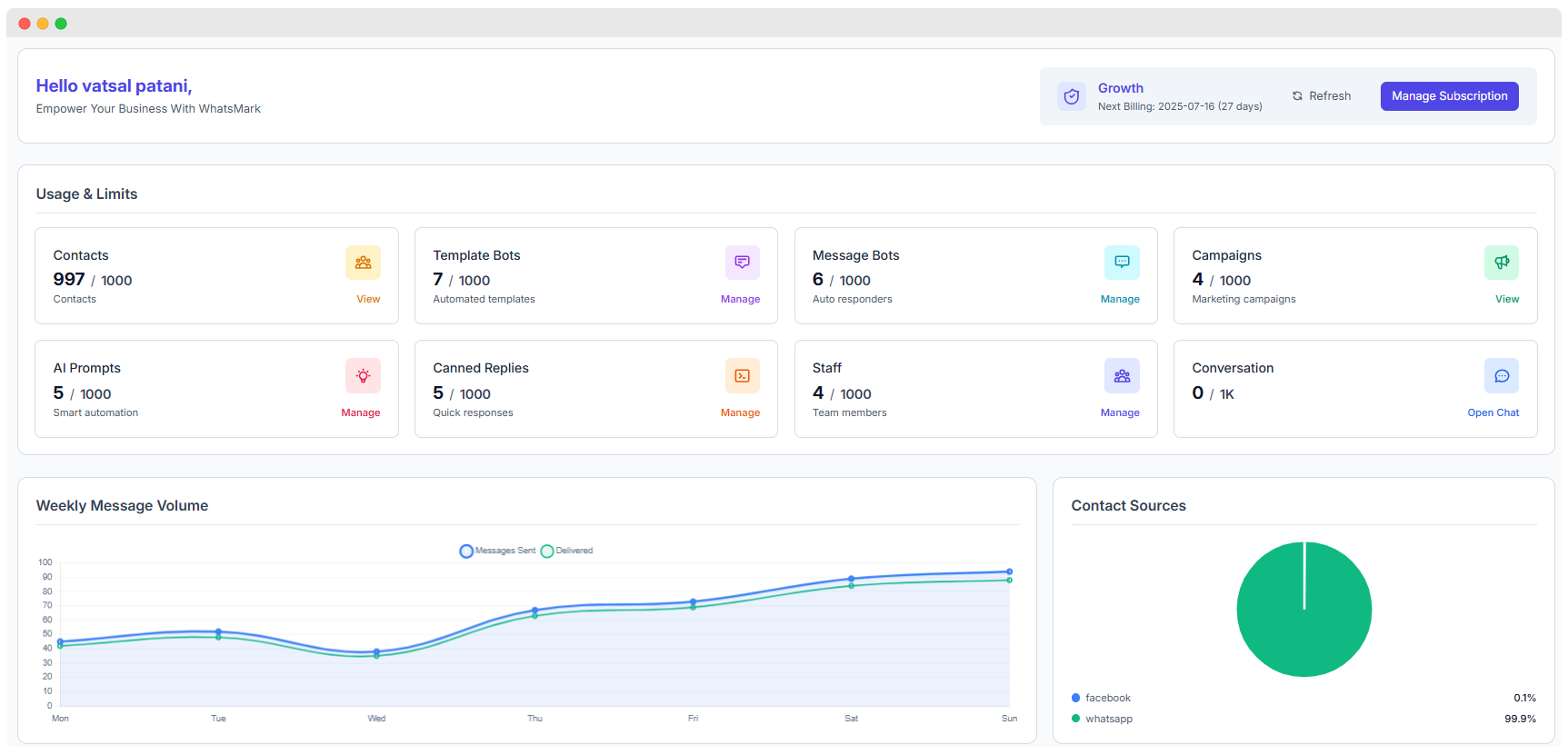
Contact Limit Tracking: Monitor real-time usage (e.g., 997 / 1000 contacts used).
Bulk Import Options: Upload contacts via CSV, third-party integrations, or manual entry.
Audience Segmentation: Create dynamic groups based on tags, behavior, or profile fields.
Engagement Tracking: View message activity per contact (opens, clicks, responses).
Preference Management: Enable opt-ins, opt-outs, and DND (Do Not Disturb) controls for compliance.
Rich Contact Profiles: View conversation history, campaign responses, and notes per contact.
Learn more: Learn more about Contact Management →
Custom Template Creation Design rich-text templates using dynamic fields and media attachments (limit: 7 / 1000 templates used).
WhatsApp Approval Workflow Submit templates directly for WhatsApp review and monitor approval status in real time.
Multilingual & Categorized Templates Organize templates by language and purpose (e.g., Order Updates, Reminders, Promotions).
Performance Analytics Measure open rates, click-throughs, and usage stats for each template.
Template Moderation Modify rejected templates and resubmit with reasons or improvements.
Learn more: Learn more about Template Bot Management →
Auto-Responder Setup Instantly reply to customer messages with pre-set responses. (Usage: 6 / 1000 bots configured)
Conversation Flow Builder Design structured message sequences using flowcharts or drag-and-drop tools to guide users through a process or funnel.
Keyword-Based Triggers Define specific keywords to trigger replies, offers, or lead collection prompts automatically.
FAQ Automation Automatically address common questions like pricing, order tracking, or store hours without human intervention.
Business Hour Responses Set different bot behaviors based on business hours (e.g., "We're currently offline, but we'll reply soon").
Learn more: Learn more about Message Bot Automation →
Campaign Limits: Manage up to 4 / 1000 active campaigns.
Scheduled Campaigns: Plan and automate message sending at optimal times to maximize engagement.
A/B Testing: Test different message variants to identify the most effective content and approach.
Performance Tracking: Monitor delivery rates, open rates, click-throughs, and overall campaign engagement.
Personalization: Use dynamic contact variables (e.g., names, locations) to tailor messages for higher relevance.
Learn more:Learn more about Campaign Management →
AI Prompts for Automation: Utilize AI-generated prompts and templates to automate responses (limit: 5 / 1000).
Natural Language Processing (NLP): Understand customer intent and respond naturally in conversations.
Intelligent Response Suggestions: Receive AI-powered suggestions for replies to improve accuracy and speed.
Context-Aware Conversations: Maintain context over multiple interactions to handle complex queries smoothly.
Continuous Learning: The AI learns from past interactions to improve responses over time.
Learn more:Learn more about AI-Powered Automation →
Canned Replies Storage: Save up to 5 / 1000 pre-written replies for reuse across conversations.
Response Categorization: Organize replies by topics or categories for easy retrieval.
Instant Access: Quickly insert canned responses during live chats or automated workflows.
Personalization: Customize replies dynamically using variables (e.g., customer name, order details).
Team Sharing: Share quick responses with all team members to maintain consistent communication.
Learn more:Learn more about Canned Replies →
Add Team Members: Invite and manage up to 4 / 1000 team members.
Role-Based Permissions: Assign specific roles and access levels to control what each team member can view and edit.
Team Activity Monitoring: Track member actions, logins, and interactions to ensure productivity and compliance.
Conversation Assignment: Delegate specific customer conversations to individual agents for focused support.
Performance Tracking: Measure team metrics such as response times, resolution rates, and engagement levels.
Real-Time Conversation Management: Handle live chats with customers instantly. (Usage: 0 / 1000 active chats)
Multiple Agent Support: Allow several team members to participate and collaborate on conversations simultaneously.
Conversation History Tracking: Maintain detailed logs of past messages for context and reference.
File and Media Sharing: Exchange images, videos, documents, and other media within chats seamlessly.
Customer Information Integration: Access and display relevant customer details during conversations to personalize support.
Learn more:Learn more about Live Chat & Conversations →
Gain valuable insights into your WhatsApp marketing efforts with comprehensive analytics and reporting tools.
Track and analyze your messaging activity on a weekly basis to optimize outreach:
Messages Sent: Monitor the total number of outbound messages sent each week.
Messages Delivered: Track how many messages were successfully delivered to recipients.
Performance Trends: Compare message volumes week-over-week to identify growth or decline.
Peak Activity: Identify the days and times when message traffic is highest for better scheduling.
Understand how your contact list is growing and engaging with your campaigns:
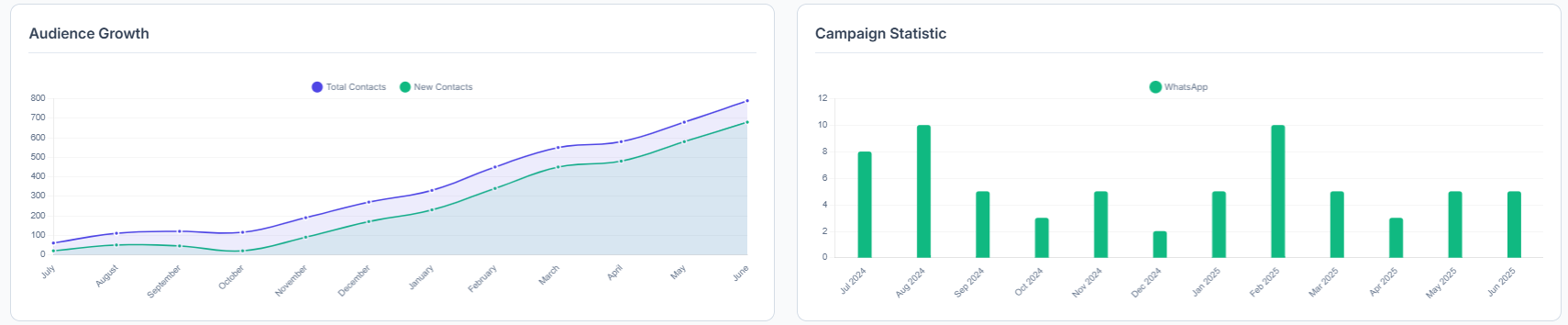
Total Contacts: Monitor the overall size of your contact database over time.
New Contacts: Track how many new contacts are added during each period.
Engagement Metrics: Analyze the ratio of active versus inactive contacts to gauge engagement levels.
Growth Velocity: Measure the rate of contact acquisition month-over-month to identify trends.
Discover where your contacts come from to optimize acquisition channels:
WhatsApp: Contacts added directly through WhatsApp (e.g., 99.9% in sample data).
Facebook: Contacts imported from social media platforms like Facebook (e.g., 0.1%).
Other Sources: Contacts acquired through website forms, imports, referrals, or other methods.
Source Performance: Evaluate the quality and engagement rates from each acquisition channel to focus efforts effectively.
Before you can start sending messages or launching campaigns, you need to register your tenant account and activate your subscription.
Visit the Landing Page Access the official SaaS platform where tenant accounts are created.
Choose a Subscription Plan Select from available tiers based on your usage needs (e.g., number of contacts, campaigns, bots).
Register Your Tenant
Fill in your company name and contact details
Set your login credentials
Submit the registration form
Complete Payment Choose one of the following payment methods to activate your subscription:
💵 Offline Payment
💳 Stripe Payment Gateway
🏦 Razorpay Integration
Wait for Activation After payment is confirmed, your tenant account will be activated by the system or admin.
Want to see the process in action? ▶️ Click here to watch the registration guide on YouTube
This tutorial walks you through tenant setup, payment, and feature configuration.